
Utah State University institutional information must be stored in systems that support appropriate security, access management, and operational oversight. These procedures describe where institutional files and documents should be stored, how storage decisions are made, and the responsibilities of faculty and staff when managing university information in alignment with USU Policy 5200. Institutional files and documents must be stored in approved USU managed systems. Personal or consumer cloud services such as Dropbox, Google Drive (personal), iCloud Drive, Box personal accounts, and similar services are not approved for storing or sharing university data, even if the data is not sensitive.
University File/Document Types with Storage Options
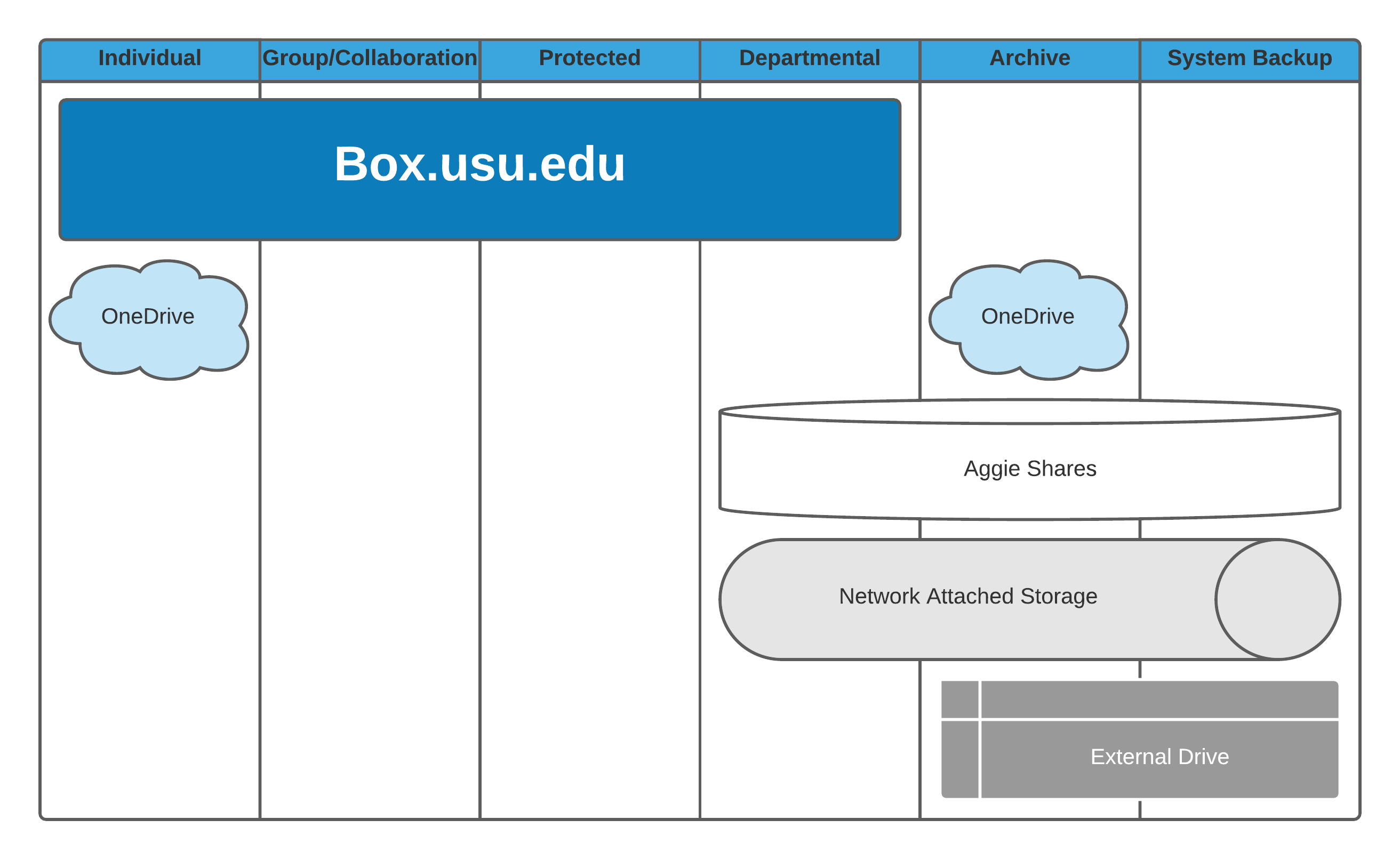
University File/Document Types
- Owned and managed by an individual
- Requires editing, review, and sharing with others
- Office files/documents
- Pictures, video, and audio files
Option(s)
- Owned and managed by department or individual
- Could be PII (Personal Identifiable Information), HIPAA (Health Insurance Portability and Accountability Act), FERPA (Family Educational Rights and Privacy Act), PCI (Payment Card Industry) or other University sensitive data
- Requires special handling and security
- Any type of file/document
- Could be long term or short term use
Option(s)
Resources
- Owned and managed by the department
- Requires sharing and access by other department members
- Office documents
- Pictures, video, and audio files
- Recommended for long term storage of University files/documents
Option(s)
- Used by individual or department
- Could require ability to share
- Any type of file/document
- Used for historical purposes or limited access
- Longer term storage
Option(s)
- System files for computers that must be available
- Provides recovery point for restoration in emergency
- Files are large
- Not allowed in Box or OneDrive
Option(s)
University File/Document Storage Options
Cloud Storage Options
Online or cloud storage options are services provided that house your information on the internet. These are often easily accessed from any computer with an internet connection and the proper credentials.
University Storage System of Record for Files/Documents
Pros
- Internal and external collaboration
- Departmental and individual storage
- Approved for protected data
- Accessible from Windows and MacOS
- Accessible from Mobile Devices via Box Mobile App
- Available as folders by installing Box Drive
- Files are available anywhere by logging in to box.usu.edu from any internet browser
- Files are encrypted
- Protects against ransomware
- Backups are provided by Box
- Provides access to past versions
Cons
- No system backups are allowed
Quotas
- Student — 50 GB
- Faculty/Staff — 5 TB (can request increase)
- Department — 60 TB (can request increase)
University Storage for Individual Files/Documents
Pros
- Internal collaboration
- Individual storage
- Microsoft Office Documents available
- Accessible from Windows and MacOS
- Accessible from Mobile devices via OneDrive Mobile App
- Available as folders by installing OneDrive, part of Office365
- Files are available anywhere by logging into onedrive.usu.edu from any internet browser
- Files are encrypted
- Protects against ransomware
- Backups are provided by Microsoft
Cons
- No external file sharing or collaboration
- Not supported for protected data
- No system backups allowed
Quotas
- All usu.edu accounts — 5 TB
On-Premise Options
On-premise options are physically housed and implemented at a USU location. These range from file shares hosted by central IT to custom solutions developed with your Desktop Support personnel.
Departmental Physical Storage
Pros
- Internal file sharing
- Departmental and individual storage
- Accessible from Windows and MacOS
- Managed by department
Cons
- Only available on USU network
- Costs of maintaining hardware long term
- System must be backed up elsewhere for critical information
Individual Physical Storage
Pros
- Individual storage
- Accessible from Windows and MacOS
- Managed by owner
Cons
- Only available to connected computer
- More limited space alternatives
- No redundancy or security
- Costs of maintaining hardware long term
- System must be backed up elsewhere for critical information
Frequently Asked Questions
What if I reach my quota?
- For Box, review the latest information on options under Box: Quotas and Data Management.
- For OneDrive, review the latest information on options under OneDrive: Quotas and Data Management.
What if I work with extremely large volumes of data?
Work with your Desktop Support for options to meet your needs.
Where should I store Research Data?
All of the listed University Data Storage options may be utilized for research data; subject to compliance, storage quotas and suitability limitations. For research needs that are not satisfied by these self-service storage options, please work with the Research Data Management Services Department in the USU Libraries for assistance and your desktop support team for expert customized advice. The USU Office of Research also provides services that may be of assistance to researchers including High Performance Computing services.
Can I use Dropbox, Google Drive (personal), iCloud, or other non USU cloud storage for university data?
No. USU institutional data must be stored in USU approved and USU managed storage systems. Approved storage is required because USU managed systems can provide the protections needed for university, state, and federal policy compliance, including access control, auditing, and institutional support. This also fosters wise financial stewardship by not engaging in duplicative spending for similar services.
Personal or consumer cloud services such as Dropbox, Google Drive (personal), iCloud Drive, Box personal accounts, and similar services are not approved for storing or sharing university data, even if the data is not sensitive.
If you have a unique research or technical requirement that does not work with the approved options, work with your MyTech support and the Service Desk to help identify a compliant solution.