
Campaign Tracking URLs: The Power of UTMs
Campaign tracking is a vital component for understanding marketing performance. The detailed insights provided by UTM parameters can significantly impact the understanding of the success of your campaigns.
What are Campaign Tracking URLs
Campaign Tracking URLs are special web links with added details that help marketers measure the results of campaigns that point to pages on their websites. They let marketers see where their website visitors are coming from, what methods they're using to get there, and how well their online campaigns are doing.
Anytime your department shares a link to anywhere on your website as part of a marketing campaign, it is a good practice to use a campaign tracking link. They can be used on a poster, lawn sign, digital sign, or in an email message. This is a straightforward yet powerful method to customize your links for in-depth analytics that help you make informed online strategy decisions.
Components of UTM Parameters
Think of your parameters as a hierarchy/outline for tracking your campaigns. The more levels you use, the more granular your data will be.
- Source: Identifies where the traffic is coming from. In other words, the referrer (e.g. usu.edu/today, IT Web Team, UMAC)
- Medium: Specifies the marketing medium. (e.g. banner, email, magazine, flyer)
- Campaign: Highlights the specific marketing campaign associated with the link. Product, promo code, or slogan (e.g. Spring Sale)
- Term: Useful for tracking keywords in paid search. (optional)
- Content: Allows tracking of different content variations. Use to differentiate ads. (optional)
Building the Campaign Tracking URL
Campaign URL Builder is a free tool developed by Google to quickly create Campaign Tracking URLs.

Using Your Campaign Tracking URL
The URL that is created is rather long and unreadable for humans. We recommend the following ways to "mask" your URL:
- Linked text: Masks the URL behind linked text, great for emails and referring webpages
- Tiny URL: Shortens the URL (http://tinyurl.com/yvmcp7n9) to make it more readable, when the URL needs to be visible (e.g. the USU Calendar); create this inside the Campaign URL Builder tool (must create a Bitly account) or inside Omni CMS (doesn't have to be an Omni CMS URL)
- QR code: Scannable URL, great for print and digital campaigns, not for use as an image on a webpage
How to Access Campaign Data
At USU, you can work with the IT Web Team to create a report to present your campgaign data. This data can also be added as a page to your already existing Looker Studio analytics report.
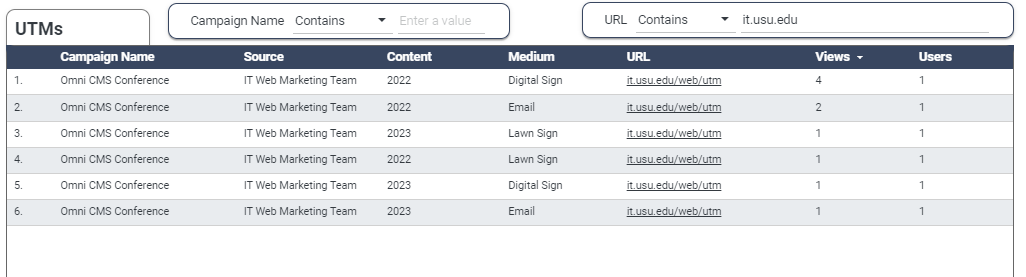
If your unit has a full web support agreement with the IT Web Team, reach out to have us help you set these up, including QR codes and tiny URL creation.
If you don't, we're happy to answer questions on how you can get started building these for yourself.